


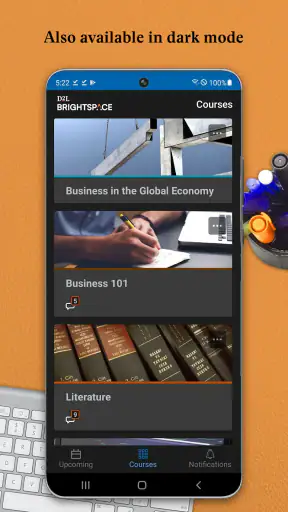
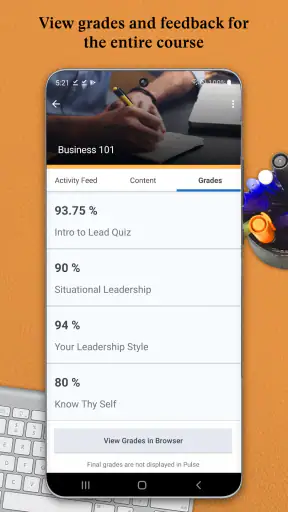
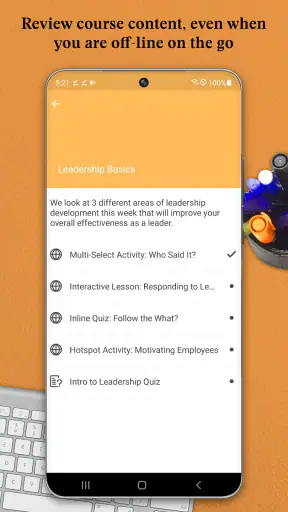
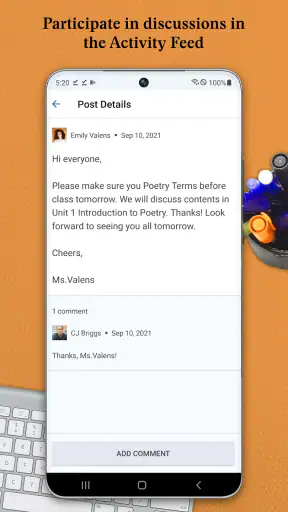
Brightspace Pulse is the kind of education app I appreciate most when my course schedule is already getting messy. Rather than replacing the full Brightspace learning environment, it gives me a more focused way to keep an eye on learning activity, deadlines, announcements, and progress from a mobile device. I found that distinction important: this is primarily a companion for staying organized, not a complete substitute for every browser-based course task.
Developed by D2L Corporation, it is available as a free app in the Education category. It has reached more than one million installs and holds a 4.8 average from roughly twenty-eight thousand ratings, which suggests that its central idea works well for many learners. It is rated Everyone, and the current release is 2.2607.0.1003828 for devices running Android 7.0 or later. Those details make it approachable for students using older Android phones, although the quality of the experience still depends heavily on how an institution has configured Brightspace.
What Brightspace Pulse is really useful for
My first impression is that Pulse works best as a quick academic dashboard. When I open it with a clear purpose, I can check what needs attention without wandering through every course area. That is especially useful between classes, during a commute, or when I want to confirm whether a deadline is approaching before committing the evening to something else.
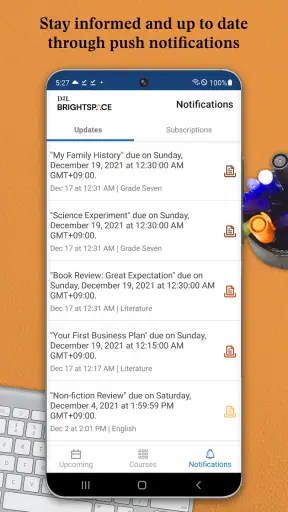
The app brings together several kinds of information that are easy to overlook when they are spread across separate course pages. Learning activity, due dates, updates, and progress all become part of one mobile routine. I would not describe that as a replacement for reading every instruction carefully, but it is a practical safety net. A short daily check can reveal that a discussion has opened, an assignment is nearing its deadline, or a course has changed in a way I might otherwise miss.
The strongest use case is a learner taking several courses at once. With one class, it is usually possible to remember the basic rhythm of the week. With multiple classes, small deadlines compete for attention, and a dedicated overview becomes much more valuable. Pulse helps me think in terms of the next action rather than the course I happened to open most recently.
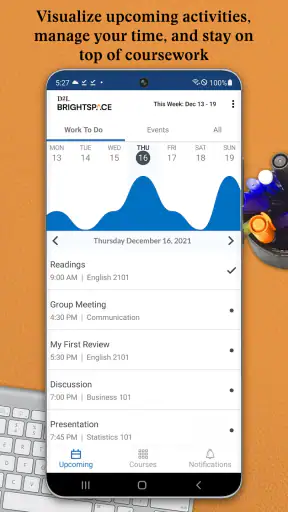
That overview also changes how I plan study time. Instead of waiting until I sit down at a computer, I can use a spare minute to see what is coming. I might notice that a reading task is due before a larger assignment and adjust my evening accordingly. This is a modest feature in theory, but it addresses a common problem in online learning: the work is not always difficult to find, but it is easy to lose track of.
Where people commonly get stuck
The first obstacle is usually not navigation. It is access. Pulse depends on the Brightspace environment used by a school, college, training provider, or other organization. If the institution has not enabled the expected mobile connection, or if I choose the wrong organization during sign-in, the app can appear less useful than it really is. Before assuming that the application is broken, I would check that I am selecting the correct school or learning provider and using the same account associated with my courses.
Another point of friction is expecting the app to behave like a general student planner. It is not a blank calendar where I can freely enter every personal commitment. Its value comes from reflecting learning information that exists in the connected Brightspace environment. If a teacher has not posted a due date, update, or activity there, Pulse cannot magically turn an unrecorded task into a complete reminder.
This matters in real life. Suppose an instructor mentions an additional preparation task during a live session but does not add it to the course area. I might reasonably expect to see it in the app, yet there is nothing for Pulse to display. In that situation, the gap is in the course workflow, not necessarily in mobile software. I keep a separate personal note for verbal instructions and use Pulse for the official course information.
Login loops are another situation where patience helps. I would avoid repeatedly entering credentials without first checking whether the selected organization is correct. If the account works in the normal Brightspace web experience but not in Pulse, comparing the two is a useful diagnostic step. If neither works, the institution’s account or sign-in process is a more likely place to look.
Setup checks that prevent avoidable frustration
I recommend doing the initial setup when I have a few quiet minutes rather than just before an assignment deadline. After installing the free app, I would identify the correct learning organization, sign in with the account that actually contains my courses, and wait long enough for the course information to appear. A rushed setup can make an empty or incomplete view look like a data problem.
Once the courses appear, I would compare the visible schedule with the course website. This is not busywork. It confirms that the right account is connected and gives me an early sense of how consistently the instructor uses Brightspace. If one course looks complete while another has little information, that difference may reflect teaching practice rather than an installation issue.
I also find it useful to decide what I want the app to do before judging it. My goal is to catch changes and deadlines quickly, not to perform every detailed course action from a phone. If I need to write a long submission, inspect complex instructions, or work with materials that are easier to read on a larger screen, I switch to the full learning environment. Pulse remains the quick-check layer.
Keeping the app current is sensible, particularly when the phone is running an older Android release. The stated minimum is Android 7.0, so compatible older devices can use it, but compatibility alone does not guarantee a smooth experience. Available storage, connection quality, and the phone’s general condition can still affect loading. I would also make sure the phone has a reliable internet connection during the first sign-in and initial synchronization.
One practical habit is to check a course from both the mobile app and the browser after setup. If the same item is missing in both places, it probably has not been published or is not part of that course’s current structure. If it appears in the browser but not in Pulse, I would refresh the mobile view, close and reopen the app, and confirm that I am looking at the correct course or date range before escalating the issue.
Recovering a workflow when something looks wrong
When my overview does not match what I expect, I work from the simplest explanation to the more serious one. First I check the connection, then I reopen the relevant course, and then I compare the information with the browser version. This sequence prevents me from making disruptive changes when the real issue is a temporary loading delay or a mistaken assumption about where an item was posted.
A missing update deserves a slightly different check from a missing assignment. Updates may be easy to overlook if several courses have been active at once, while an assignment may be visible only inside a particular course area or activity list. I would inspect the course itself before deciding that the app failed to synchronize. The app is most helpful when I treat its overview as a starting point for verification, not as proof that every course detail has been reduced to one screen.
If the information is outdated, I would refresh the view and give the connection a moment to catch up. I would avoid relying on an old screen capture or a remembered deadline when the stakes are high. For an important submission, I verify the current instructions in the course environment itself. This is one of the main trade-offs of a mobile summary: it is faster than the full site, but the full site remains the better authority for detailed work.
When a sign-in problem persists, I would record the useful facts before contacting support: which organization I selected, whether the browser login works, whether other courses are affected, and what kind of message appears. That makes the conversation with an instructor or institutional help desk more productive. Saying “the app does not work” is less helpful than explaining that the web version shows the course but the mobile view remains empty after a correct login.
I would be cautious about reinstalling immediately. Reinstallation can be reasonable after ordinary checks fail, but it should not be the first answer to a course configuration issue. If the institution has not published the expected content, no reinstall will create it. Likewise, if the account itself is locked or the organization uses a particular sign-in route, starting over in the app may simply repeat the same obstacle.
When the app is not the cause
Brightspace Pulse sits between the learner and the institution’s learning setup, so responsibility is shared. A course may have incomplete dates, inconsistent naming, delayed announcements, or instructions that live outside the official course area. In those cases, the app can accurately reflect an incomplete academic workflow. That is frustrating, but it is different from the app losing information.
Network restrictions can also confuse the diagnosis. A phone may browse some websites while struggling with a particular learning service, especially on a weak connection or a managed network. I would test again on a dependable connection and compare the result with another device or the browser. If the same account behaves the same way everywhere, the issue is probably not limited to the mobile application.
There is also a human factor. Notifications and overviews only help when I act on them. A learner who dismisses every reminder, rarely checks updates, or keeps personal deadlines only in memory may not see much benefit. Pulse is not a substitute for a study routine. Its practical role is to reduce the number of places I need to inspect before deciding what to do next.
For instructors or institutions that use Brightspace unevenly, the experience can feel fragmented. One course may provide a clear stream of activities and deadlines, while another may rely on messages, live explanations, or external tools. I would not judge the app solely by the least organized course. At the same time, I would not promise that installing it will solve a poorly maintained course area.
How it compares with usual alternatives
The obvious alternative is opening Brightspace in a mobile browser. The browser is more flexible and is often the better choice for detailed navigation, long instructions, and tasks that require the full course interface. Pulse wins on focus. It is designed around the information I want to check quickly, so I spend less time searching through menus when I only need to see what has changed or what is due.
A general calendar has a different strength. It can combine study deadlines with work shifts, appointments, travel, and personal plans. I would use one alongside Pulse if my schedule is crowded. However, a calendar depends on me entering and maintaining course information, while Pulse can surface learning activity from the connected environment. The trade-off is control versus convenience: the calendar is broader, while Pulse is more closely tied to Brightspace.
Task-management apps can be better for breaking a large assignment into steps. I might use one to plan research, drafting, and editing, especially when a course deadline alone is not enough structure. Pulse is less about building a detailed personal project plan and more about keeping the course’s current activity visible. For many learners, the most effective combination is Pulse for discovery and a planner for execution.
Email is another common substitute, but it is easy for academic notices to disappear among unrelated messages. Pulse gives course-related information a more deliberate home. Still, I would not abandon email entirely, because an instructor or institution may communicate outside the app. The best setup depends on how the course is run, not on choosing one tool and ignoring every other channel.
Who should use it and who should skip it
I would recommend Pulse to students and learners whose organization uses Brightspace actively and who want a faster way to monitor several courses. It is particularly suitable for people who often study away from a desk, forget small deadlines, or need a quick overview before deciding how to use limited free time. The free price removes an obvious barrier, and the Everyone age rating makes it broadly accessible.
I would be more cautious if my institution barely uses Brightspace, if most course work happens in unrelated services, or if I need a powerful offline study tool. In those situations, a browser, a general calendar, or a dedicated task manager may provide more value. I would also skip making it my only academic system if I need extensive personal planning, because the app’s advantage is its connection to course activity rather than unlimited customization.
Families helping a younger learner can also understand its role easily: it offers a mobile view of learning organization, not a replacement for communication with teachers or guardians. The Everyone rating is reassuring from an age-classification perspective, but the actual course content and workload still come from the educational organization. I would treat the rating as a sign of broad suitability, not as a promise that every course experience will be simple.
A realistic week with Pulse
Imagine I have three active courses and only a short break between work and evening study. I open Pulse to see which activities have moved and which deadlines are closest. One course needs immediate attention, another has a reading task that can wait until tomorrow, and the third has no new activity. I then open the urgent item in the full learning environment to read the instructions carefully and complete the work there.
The next morning, I check again rather than relying on yesterday’s plan. If an instructor has posted an update, I can adjust my schedule before the day becomes crowded. If nothing has changed, the check still gives me confidence that I am not overlooking a course. That is the app’s quiet strength: it can make a short review habit feel worthwhile without requiring me to browse every course from scratch.
My advice is to use it at predictable points, such as the start of a study session and the end of the day, instead of opening it constantly. The goal is not to turn learning into a stream of alerts. It is to create a reliable checkpoint, then move into the appropriate course area when something needs real attention.
My practical verdict
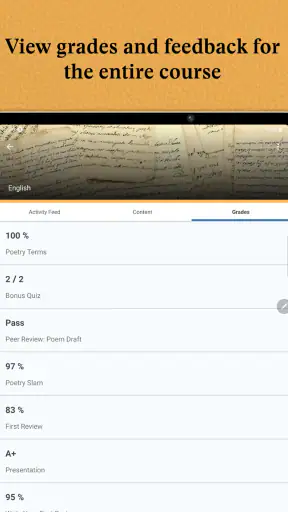
After using Brightspace Pulse as a companion rather than a complete learning platform, I see a clear reason to keep it installed. It reduces the effort of checking several Brightspace courses and gives mobile users a more direct view of activity, deadlines, updates, and progress. That focus is more useful than a generic promise to “stay organized” because it connects the check-in to the learning environment I already use.
Its limitations are equally important. It cannot repair missing course information, replace a browser for every detailed task, or turn informal teacher instructions into official deadlines. Some problems that appear to be app failures are really account, organization, connection, or course-management issues. Knowing that before troubleshooting saves time and prevents unrealistic expectations.
With a 4.8 average and a large community of users, it is an easy free option to try when Brightspace is part of my studies. I would install it, confirm that the correct courses appear, compare the first view with the browser, and then build a small checking habit around it. My main recommendation is to use Pulse as the early-warning system for coursework, while keeping the full Brightspace experience and a personal planner available for the work it cannot cover.
In short, this is a focused Education app from D2L Corporation that earns its place on my phone when the institution’s Brightspace setup is active and consistent. It is not the right answer for every learning workflow, but for a busy learner who wants fewer missed updates and a quicker view of the academic week, Brightspace Pulse is a practical and sensible companion.


